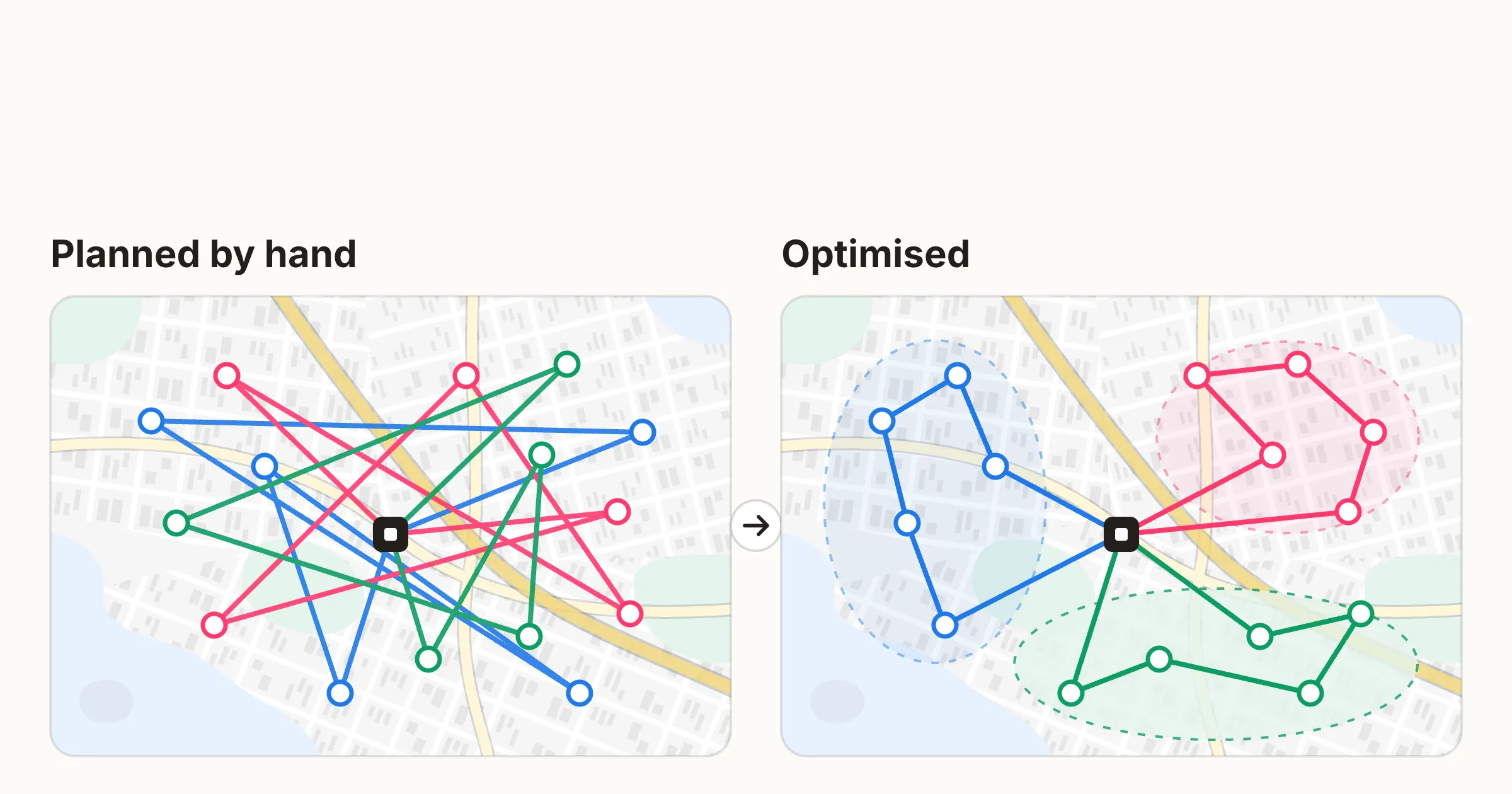
The hardest part of planning mobile work is deciding who does which job, in what order and with which vehicle. Drawing the route on a map is a small part of it.
That is why a demo where ten stops line up neatly says little about your day-to-day. A real day has two-person jobs, jobs that can only start after another one, and vehicles that can’t carry everything.
This guide collects 12 questions worth asking every vendor when you are looking for a tool to plan field service, installation, cleaning or transport work. At the end there is a scoring model and instructions for a pilot test, so you can compare candidates with your own data.
The guide was written by Dynamik Oy, which develops Allocator, software for optimising routes, schedules and shifts for mobile work. The questions work for comparing any vendor. Allocator’s own answers are in a separate section at the end.
What does a mobile workforce optimisation tool do?
A mobile workforce optimisation tool is software that builds working days for your people automatically: it decides who does which job, when and in what order. Route optimisation software solves one part of this, the driving order.
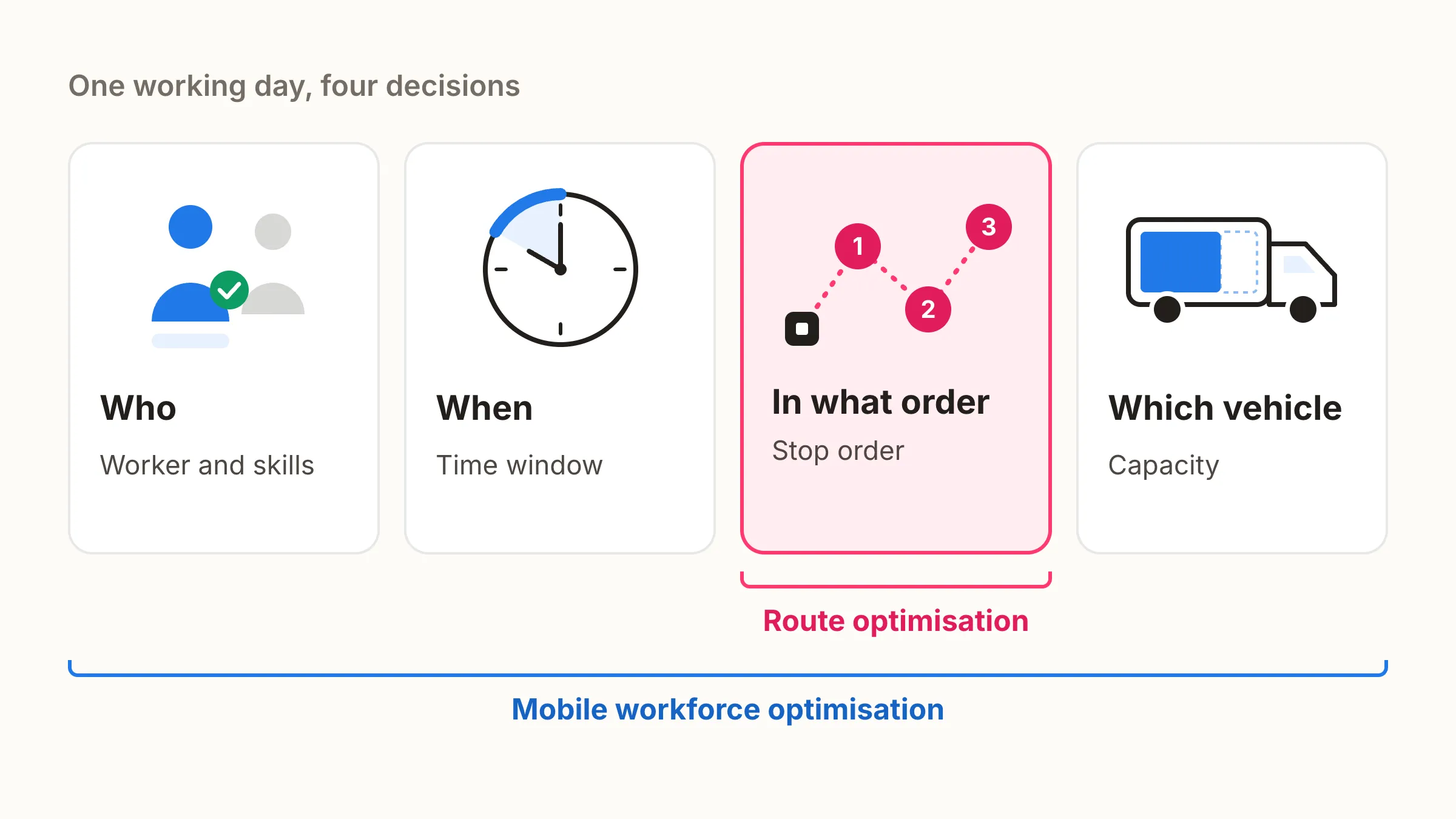
When a job needs specific skills, an agreed time window or two people at once, the driving order is no longer enough and planning has to cover the whole day. The difference is covered in more detail in the article Route optimisation vs. mobile workforce optimisation.
The table shows the typical capabilities of the three approaches. Individual products differ from these, so check each vendor’s capabilities question by question.
| Need | By hand and spreadsheet | Route optimisation only | Mobile workforce optimisation |
|---|---|---|---|
| Short driving order | Laborious and limited | Yes | Yes |
| Time windows | Checked by hand | Usually | Yes |
| Shift lengths and flexibility | Checked by hand | Varies | Ask the vendor |
| Skills and assigning work to people | In the planner’s head | Often limited | Yes |
| Site familiarity, multi-person jobs and stage dependencies | Possible but laborious | Rarely | Ask the vendor |
| Costs and vehicle capacity | Estimated | Partly | Ask the vendor |
| Changes during the day | Round of phone calls and a new spreadsheet | Varies | Yes |
| Planner control | Full, but everything is done by hand | Varies | Ask the vendor |
Questions 1–12 go through exactly the rows where the solutions differ.
What kind of software suits you?
Mobile work software solves different problems, and they partly overlap. Start from what is actually difficult for you.
| Your situation | Primary solution |
|---|---|
| Jobs are already assigned and you want shorter drives | Route optimisation |
| Work orders, documentation and invoicing need to be under control | Field service management system |
| Jobs need to be assigned automatically by skill, time and location | Mobile workforce optimisation |
| The number and timing of shifts need to match the workload | Shift optimisation |
| Customer bookings scatter the days across the area | Optimised booking |
Many companies need two or more of these. A common combination is a field service management system where jobs are created, alongside an optimisation tool that plans the days.
A separate optimisation tool may not be worth it if you have only a few workers, visits repeat the same way week after week, or planning already takes little time. In that case the benefit is small compared with the effort of deployment.
What does AI do in an optimisation tool?
AI can mean very different things in planning software. Ask the vendor which methods the product actually uses and for what.
- Mathematical optimisation searches for the best feasible plan it can find, based on the given goals and constraints. This is the core of planning, and it does not require machine learning.
- Machine learning can, for example, predict job durations from historical data.
- Language models and agents can help with importing and handling data, but they do not by themselves guarantee a feasible plan.
Also find out what data the software needs and how it makes sure the plan follows the rules before it is published. The planner needs to see why the software suggests something (question 10). A shift list written as text by a language model does not yet guarantee that the list complies with working time legislation.
12 questions for the vendor
The questions follow the order in which a purchase decision usually takes shape. First, what the tool can plan, then how it works day to day, and finally how it is deployed.
1. Does the tool plan only routes, or the whole working day?
Some tools only calculate routes, others plan the whole working day. Route optimisation receives a ready list of jobs and calculates the shortest driving order for them. Mobile workforce optimisation also decides who does the job and when. The difference shows as soon as workers have different skills or a customer has been promised a specific time. If jobs have to be assigned by hand before the software can calculate, planning still takes most of the time.
2. Which constraints does the tool take into account?
Constraints decide whether the plan can be carried out. The basics are time windows, workers’ skills and working hours, shift lengths and flexibility, vehicle capacity, working time legislation and contract terms. Ask which of these the tool treats as conditions it must not break, and which as preferences it can override. Also ask whether you can add constraints yourself or whether every change goes through the vendor. When a contract term or way of working changes, the change should be in use the same week.
3. Does the tool know the sites and the workers’ experience?
A worker who knows the site works faster: they know where the keys are, how the equipment works and what the customer expects. In cleaning, property maintenance and customer-specific servicing this often matters more than a difference of a few kilometres. Ask whether the tool can take into account the history between worker and site, and whether the weight given to favouring a familiar worker can be adjusted. Otherwise the software moves workers to new sites to save kilometres, and customers notice. More on this in the article Route optimisation vs. mobile workforce optimisation.
4. Can the tool handle jobs that need more than one worker?
Some jobs need two or more workers at the same time: a heavy lift, a two-person installation, or work where one person works and another supervises. A job like this ties two calendars to the same time and place, so it is often the hardest piece of the day’s puzzle for a planner. Ask whether a single job can be given a number of workers and skills per worker, for example one electrician and one assistant. Also ask whether the tool finds a time when everyone needed is free, and how it handles a situation where one of the workers falls ill.
5. Can the tool handle multi-stage jobs where stages depend on each other?
In a multi-stage job the stages are done in a set order, and there may be waiting in between, for example removal before installation, or painting and drying time. The stages can belong to different workers, days and places. Ask whether the tool can model the dependencies between stages, for example the next stage no earlier than after the previous one or no later than 24 hours after it, and plan them as one whole. If dependencies are handled by hand, the tool optimises everything except the hardest part.
6. What does the tool minimise, and can you set the costs yourself?
First ask which costs the tool tries to reduce. The tool compares plans using a formula called a cost function and picks the cheapest one it finds. What goes into the formula decides what the tool considers a good plan.
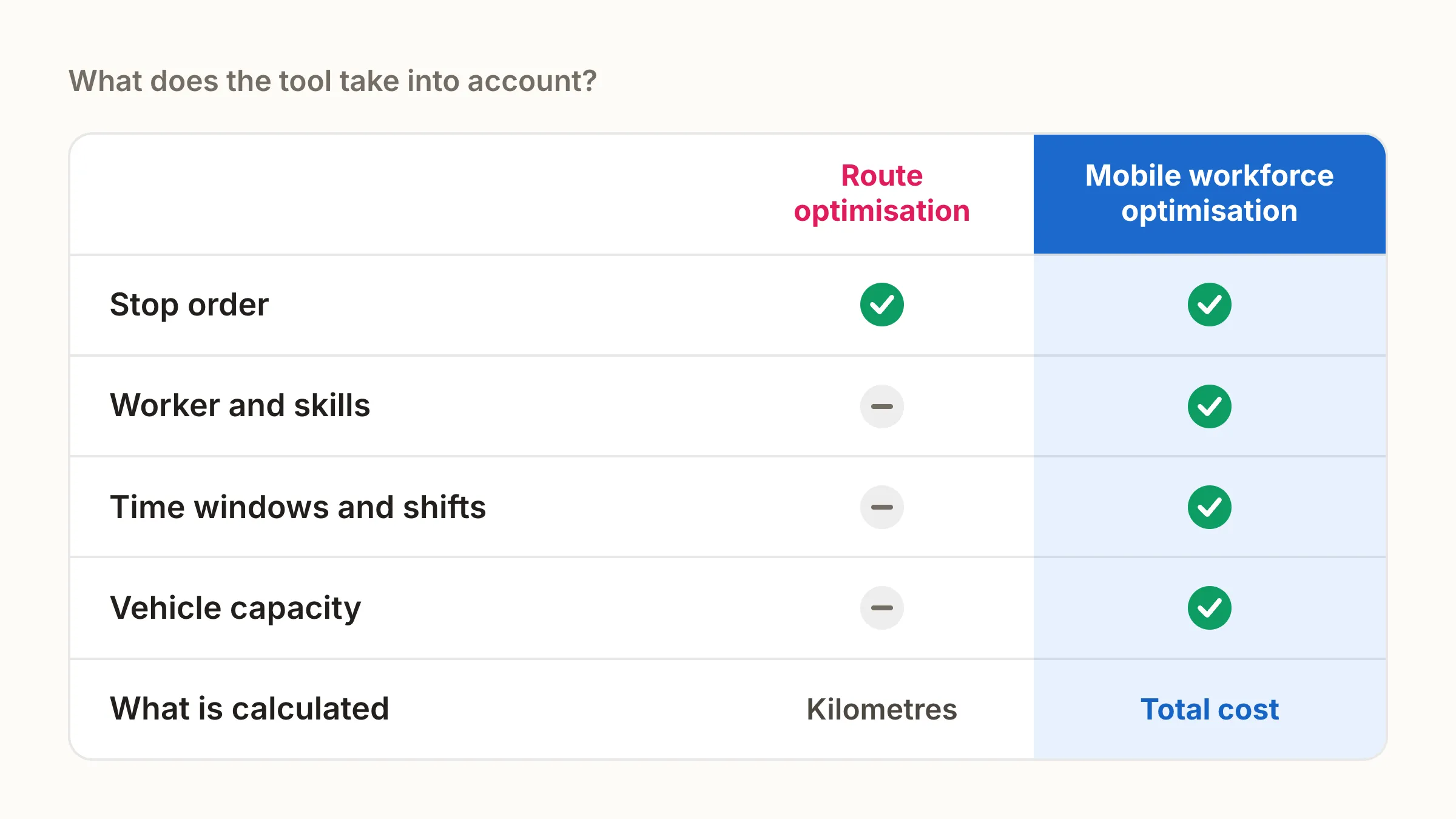
The formula usually includes at least driving costs (kilometres and drive time), the worker’s working time with supplements (overtime, evenings and weekends) and a fixed daily cost per vehicle. If the formula only contains kilometres, the tool shortens driving even when the total cost goes up.
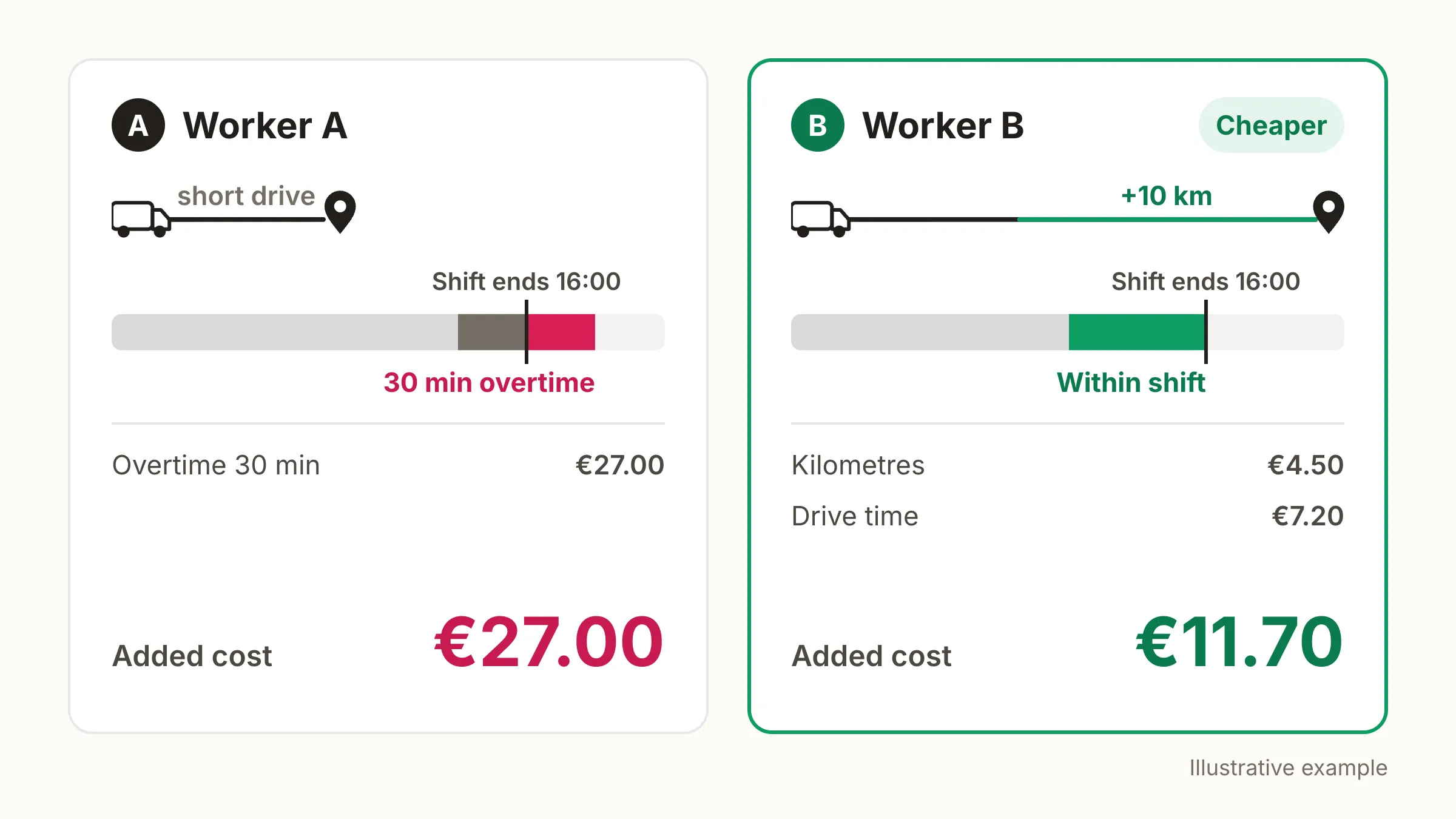
An illustrative example: the last job of the day can go to worker A, whose route already passes nearby, or to worker B, who has free time left in their shift but a drive 10 kilometres longer. A could only fit the job in by working half an hour of overtime.
| Cost item | A: shorter drive, overtime | B: detour, no overtime |
|---|---|---|
| Extra kilometres (€0.45/km) | €0 | €4.50 (10 km) |
| Extra drive time (€36/h) | €0 | €7.20 (12 min) |
| Overtime (€36/h + 50%) | €27.00 (30 min) | €0 |
| Total added cost | €27.00 | €11.70 |
Assumptions: B’s free working time is paid in any case, so the job itself adds no cost for them. Drive time has been counted for B to be on the safe side, even though it also fits within the shift. A tool that minimises kilometres would give the job to A; one that minimises cost would give it to B.
Find out whether you can set these cost items yourself and change them when fuel prices, wages or contracts change. Also ask whether different vehicles and workers can have different rates (van and truck, own employee, agency worker and subcontractor), and whether the plan’s costs are shown itemised. The breakdown matters because it lets you compare two plans in euros and notice if one cost item weighs too heavily on the result. If the costs are fixed vendor defaults, the results are based on the vendor’s average customer.
7. Where does the day start, how long is it and how flexible is it?
Not every worker leaves from the depot in the morning. Many service and installation workers leave from home and return there in the evening in a company vehicle. Ask whether each worker can have their own start and end point, whether it can vary by day, and how commuting time is counted as working time. The start point changes which job is worth doing first and which last.
Also check whether each worker can have their own shift length, start time and breaks, and whether the tool follows the rest periods in working time legislation. Then look at flexibility: can a shift start or end half an hour earlier or later, and can a worker continue on overtime? With flexibility, a tight day can be handled without an extra worker, as long as the tool can price that flexibility (question 6).
8. Does the tool take vehicle load capacity into account?
A vehicle’s load capacity limits what one vehicle can get done in a day. In logistics this is obvious, but in service and installation work the vehicle carries spare parts, equipment, ladders and materials, and running out of space mid-day forces an extra trip to the warehouse. Ask whether the tool tracks load volume, weight or item count, and whether it accounts for the load building up and emptying during the day, for example a pickup before a delivery. Also ask whether it tells vehicles apart when one is a flatbed and another a box van.
In practice capacity data is often incomplete. The volume or weight of a delivery is missing from the order, the figure is an estimate, or it only becomes clear at loading. If the tool treats a missing value as zero, it puts too many jobs in the vehicle and the vehicle fills up mid-day. Find out whether you can set a capacity reserve, deliberately leaving part of the space unused, and whether the reserve can be set per vehicle.
9. What happens when the day changes partway through?
A plan holds until someone falls ill, a job is cancelled, a vehicle breaks down or a customer calls with an urgent job. Ask how quickly the tool calculates a new plan and whether people in the field see the change on their phones right away. Also find out whether replanning can be limited, and whether the saving can be weighed against how much an already published day changes. If everyone gets a completely new day for the sake of a small saving, it causes confusion in the field.
10. Who makes the final decision?
Even an automatic plan doesn’t work if the planner can’t trust it or steer it. Ask whether the planner can lock a job to a specific worker or time, move or swap jobs by hand, and approve the plan before it is published. Also ask whether they can see why the tool suggests something. If the reasons aren’t visible, the planner builds the day themselves and the automation goes unused.
11. Does the tool work with your current systems, and how do jobs come in?
Most companies already have an ERP, field service or maintenance system where jobs are created. Find out whether the tool replaces it or works alongside it, and whether the integration is two-way: jobs come in, and plans, completions and hours flow back without double entry. Ask which systems have ready-made connectors and whether the API is documented.
Integration must not be a precondition for getting started. Ask whether jobs can also be imported, for example as an Excel file, so the tool can be tested before an integration is built. Also find out what happens when your own system changes: does the planning tool have to be replaced at the same time, or can it continue alongside the new one?
In the field, a mobile app is an important addition so that information moves efficiently between planner and worker. Ask whether workers can see the day’s jobs and changes on their phones, and whether they can mark a job as done in the same app.
12. How long does deployment take and how is the price made up?
Ask the vendor for a realistic deployment schedule for two options: a small pilot and the whole organisation. Ask what deployment includes (support, training, integration work) and what it doesn’t. The pricing model affects the total cost more than any single figure. The price can be based on workers, vehicles, calendars, routes or planned jobs, and in different models the cost grows differently as the operation grows or varies by season. Ask the vendor to calculate the price with your own fleet and headcount, and compare the result with the estimated annual saving.
Ask for the price in writing and itemised: licences, deployment, integrations, any add-on modules and ongoing support. Also ask which data is required to get started and who fixes incomplete addresses, job durations and skill data. Data quality is often the biggest schedule risk in deployment.
On security, ask at least where the data is stored, how the processing of personal data has been agreed under GDPR, how access rights, single sign-on and logging are handled, and how the service recovers from an outage. Also ask for results the vendor has measured with similar customers in your industry.
Finally, check the terms of commitment. Can the tool be tested in live use before a long contract, and how long is the notice period?
Shifts and booking belong in the same plan
The day’s plan is often settled before any routes are calculated: in how many shifts are on the roster and what time the customer has booked a visit. If shifts and bookings are handled separately, even the best route optimisation can’t fix their mistakes.
Shift optimisation
When the roster is made first and the routes only on top of it, there are easily more shifts than the work requires, or no worker can be found for a route. Ask whether the tool plans shifts and routes in the same calculation, and whether it tells you how many shifts the work actually requires by shift type compared with current staffing. Recruitment, holiday and overtime decisions are made from that difference.
Booking that knows the plan
If customers are shown every free slot, visits spread across the area and some days are left half empty. Ask whether customers can be offered only the slots that fit already booked visits, location, skills and vehicle capacity.
The need depends on the nature of the operation. Shift optimisation is most useful when there are many shifts and the workload varies. Booking is most useful when customers book a large share of visits themselves. Also ask whether these are part of the same product and price or separate modules.
Pilot test: compare tools with your own data
The example shown in a vendor demo is often chosen to suit the tool’s strengths. Your own data shows how the tool copes with your work. How much preparation it takes depends a lot on the state of your data.
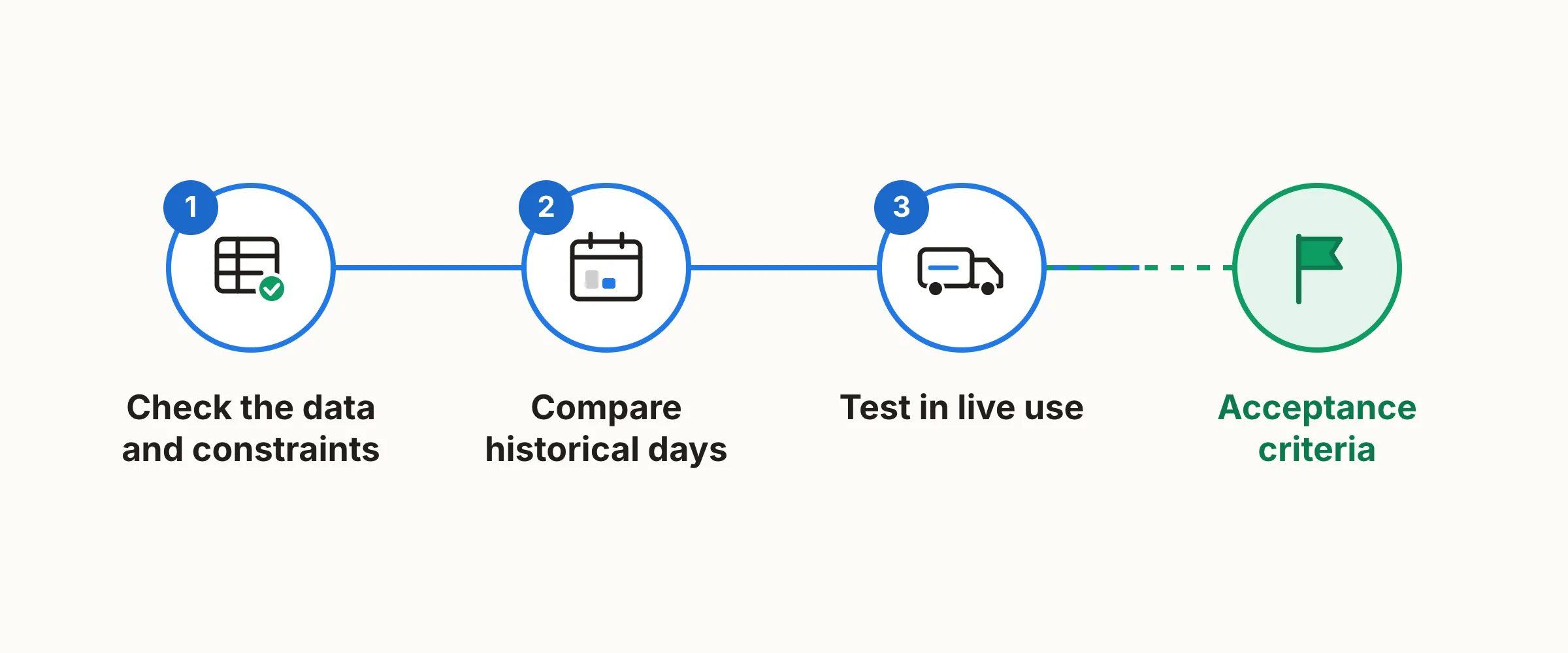
Stage 1: check the data and constraints
Pick three real days from recent months: a normal day, a busy day and a day when something went wrong. Gather the same data for each: jobs and time windows, workers, skills and shift lengths, vehicles and capacities, start and end points, and costs. Go through missing addresses, unrealistic job durations and outdated skill data before you hand the material to vendors.
Stage 2: compare historical days
- Give every candidate the same data and ask for a plan.
- Measure distance driven, drive time, wasted time, billable hours and cost per job. Compare the figures with what was actually done on those days.
- Add a disruption: remove one worker or cancel one job and see how large the change to the plan is and how quickly it comes.
- Measure how long it takes the planner to check and correct the results.
Stage 3: test in live use
Historical days don’t tell you whether the plan works in the field. Let the planner and a few field workers use the best candidate with real jobs for a few weeks. Ask an experienced planner whether they would carry out the plans as they are, and if not, why not.
Acceptance criteria
Decide these before the test, so the results aren’t interpreted afterwards in some vendor’s favour:
- no critical constraint violations (skills, time window, working time legislation)
- planning time stays under the limit you set
- one disruption, such as a sick day, changes at most an agreed number of workers’ days
- total cost per job falls by at least your target
Score the vendors
You can copy the model into a request for proposal or your demo notes. Give each criterion 0–3 points and multiply the points by the weight.
| Criterion | Questions | Weight | Vendor A | Vendor B |
|---|---|---|---|---|
| Scope of optimisation and constraints | 1–8 | 25% | ||
| Plan quality with your own data | Pilot | 25% | ||
| Changes and planner control | 9–10 | 15% | ||
| Integrations, field app and security | 11–12 | 20% | ||
| Total cost and deployment | 12 | 15% |
Points: 0 = not supported, 1 = requires customisation, 2 = supported with limitations, 3 = shown to work with your own data. The weights are a suggestion, so adjust them to your needs. If you need shift or booking optimisation, add a row for each.
For each criterion, ask three things: is the feature part of the standard product, is it included in the quoted price, and can it be shown in a demo with your own data?
How Allocator answers the questions
In this section Dynamik answers the same questions about its own product. Allocator is AI planning software that builds routes, schedules and shifts for a mobile workforce on the same optimisation engine. It starts from data the company already has in its ERP, time tracking or a spreadsheet. Every plan is checked against the rules it was built from before it is offered for publishing.
| Question | In Allocator |
|---|---|
| 1. The whole day | Routes, schedules and shifts are planned on the same optimisation engine. |
| 2. Constraints | Time windows, skills, shift lengths and permitted overtime, vehicle capacity, driving distances, working time rules and contract terms are all taken into account at once. Workers’ skills are matched to each site’s requirements. |
| 3. Site familiarity | Site familiarity is taken into account in planning. |
| 4. Multi-person jobs | Multi-person jobs are taken into account in planning. |
| 5. Multi-stage jobs | Multi-stage jobs are taken into account in planning. |
| 6. Costs | Vehicle and worker costs can be set and edited by you. |
| 7. Start of day, length and flexibility | Each worker can have their own day length and permitted overtime. |
| 8. Load capacity | Vehicle capacity is taken into account as volume, weight and item count, and a capacity reserve can be set when delivery data is incomplete. |
| 9. Changes during the day | Marking someone absent takes one click, the affected part of the plan is recalculated and workers see the update on their phones. For example, a sick call comes in at 07:00 and the new plan is published at 07:05. |
| 10. Decision-making | The planner can approve, drag or override any suggestion before publishing. |
| 11. Systems | Works alongside your current system and comes along when the system changes. Two-way integration, ready-made connectors to several systems, and a REST API and webhooks; see software partners. Jobs can also be imported as an Excel file or created directly in Allocator. Field workers have a mobile app. |
| 12. Deployment, price and trial | Deployed in 1–2 days. Trial for the first 3 months with one month’s notice. Data centres in the EU. Prices below and on the pricing page. |
Source: dynamik.software and FAQ, checked 8 October 2026.
Shifts and booking
Allocator’s shift planning solves routes and shifts as one problem and tells you how many shifts the work requires by shift type compared with current staffing. It follows collective agreement rules, skill requirements and employee availability. In pilot data, the number of shifts needed fell by 7–16%, distance driven by 6–19% and payroll cost by 5–15%. The benefit depends on how much slack there is in the current plan.
Allocator’s booking offers the customer a few slots that fall on trips the technician is already making. The customer books as before, on the booking page, by phone or through the ERP, and every new booking is placed into the current plan.
Pricing
Allocator’s prices are shown on the pricing page.
| Package | Price | Includes |
|---|---|---|
| Standard package | €25/month per calendar | Deployed in 1–2 days, mobile app for field workers, 3 h of onboarding support |
| Logistics vehicle calendar | €150/month per vehicle | Deployed in about 1–2 weeks, 6 h of onboarding support |
| Enterprise (over 100 calendars or requirements of your own) | Request a quote | Multi-site and volume pricing, dedicated onboarding and training, ERP integrations, SLA, optional single sign-on (SSO) and device register |
Prices exclude VAT. Integrations are charged separately.
Example: one service day planned two ways
On one customer’s service day, the same workload needed 12 shifts with manual planning and 9 with Allocator. Wasted time fell from 26.7 hours to 6.9 hours and distance driven from 613 kilometres to 388 kilometres.
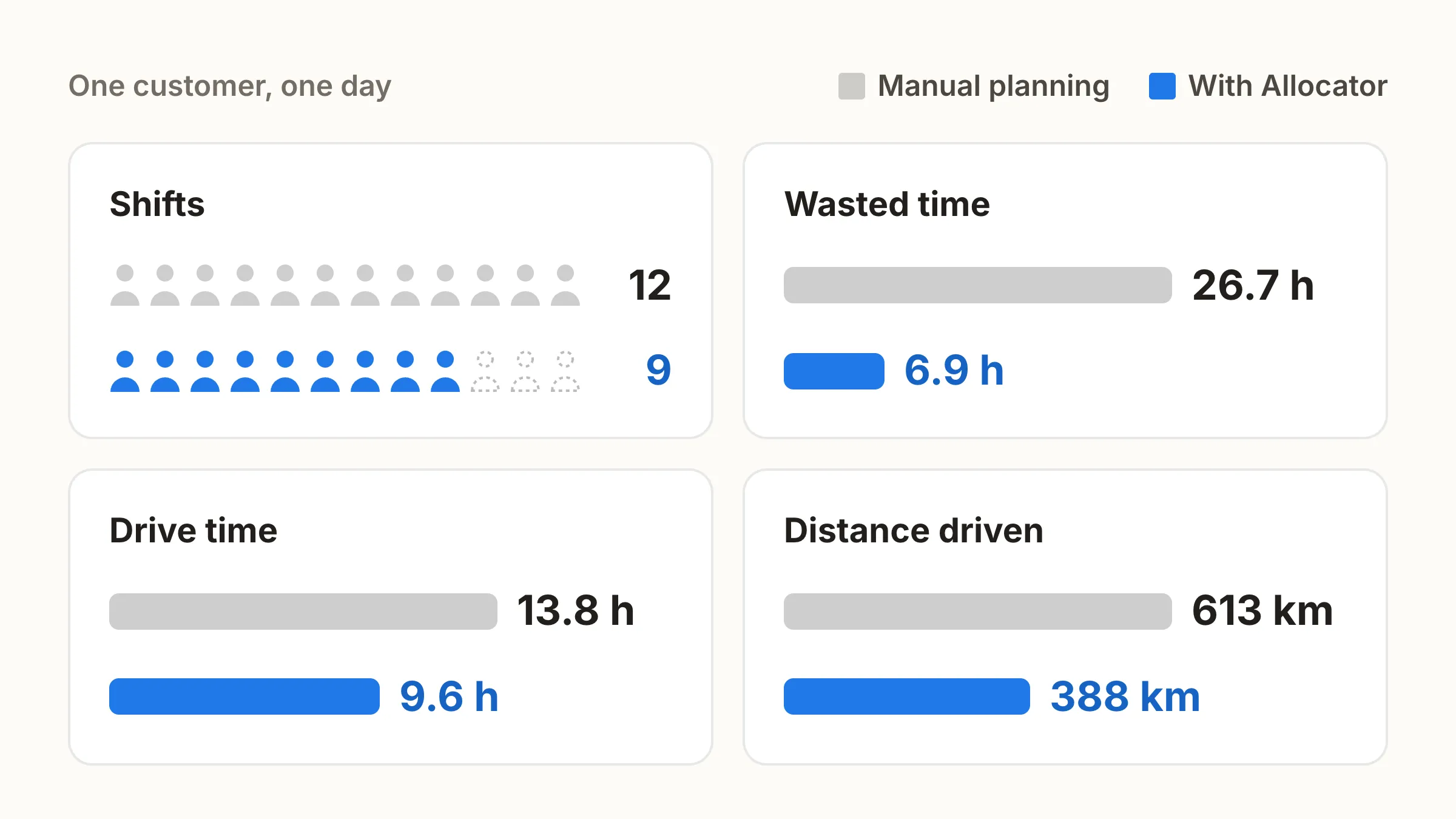
| Metric | Baseline | Optimised | Change |
|---|---|---|---|
| Shifts | 12 | 9 | −25.0% |
| Wasted time | 26.7 h | 6.9 h | −74.2% |
| Drive time | 13.8 h | 9.6 h | −30.4% |
| Distance driven | 613.2 km | 388.2 km | −36.7% |
| Driving cost / job | €37.16 | €23.53 | −36.7% |
The figures are from one customer’s single day and vary by operation. Across customers, Allocator has measured on average 31% less driving, 18% more billable hours and half the time spent planning compared with their previous manual planning. Source: dynamik.software, checked 8 October 2026.
Timo Kyllönen, Head of Installation at EcoUp, describes the effect: “AI frees up time for our supervisors.”
